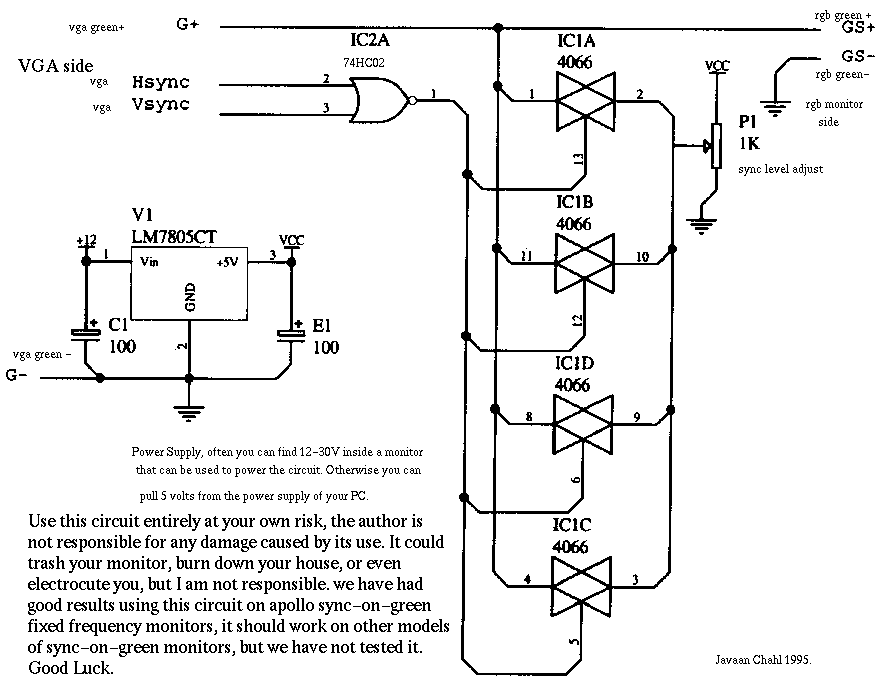
DEC monitors require Sync on Green signals, so it required the following circuit (found from here)
I ordered all the bits for this from Maplin and spent an afternoon soldering them up.
One problem that has been causing regular problems is the BNC connectors; the ones I bought (which weren't especially cheap at about a pound each) are quite unreliable, and the cable seems to fall out of them quite often. Maybe it was the way I crimped them, but it is the biggest problem with them all.
Alternatively, you may want to go and buy a sync-on-green converter. According to Nicholas Bogan, you can buy one from Griffin Technologies. According to Nicholas; "it's a inch-long thing that plugs in between the video card and cable, does both sync-on-green and composite sync for 4 BNC monitors, and costs $30 US."
All that was then required was to hack X to work. The relevant line from XF86Config is: 1024x768 mode, which works quite happily:
Modeline "1024x768" 75 1024 1048 1184 1328 768 771 777 825 +hsync +vsync
1152x864 mode, which looks a bit dodgy (you can see what I think are Sync signals round the edge of the image, and it appears to be too bright.)
Modeline "1152x864" 75 1152 1176 1312 1410 864 867 873 921 +hsync +vsync
And for SVGATextMode:
"DHM2" 75 1024 1068 1184 1268 768 771 777 825 font 9x16
(This is all using an S3 graphics card.)I've been told that the above modes should also work with VR290 and VR299, and quite probably other DEC monitors that use the same timings.
Useful references:
Horizontal:

        Frequency               54.054 kHz
        Front porch             160 ns
        Sync pulse              1850 ns
        Back porch              1690 ns
        Blanking interval       3.70 us max
        Active video time       14.8 us
        Horizontal period       18.5 us
        Pixels                  1024

Vertical:

        Frequency               60 Hz
        Front porch             0 horizontal lines
        Sync pulse              3       "
        Blanking interval       37      "
        Active video time       16 ms
        Vertical period         16.67 ms
        Lines                   864
Questions? Comments? E-mail me